Free · macOS menu bar app

The simple screenshot maker for your Mac menu bar.

ScreenshotMenu lives quietly in your menu bar and turns macOS screen capture into one click. Grab the fullscreen, a window, or any area — straight to a file or your clipboard.
🍎 macOS 13 Ventura+ 🪶 Tiny & native 💸 100% free
🔋 ⏏ 100% 10:54
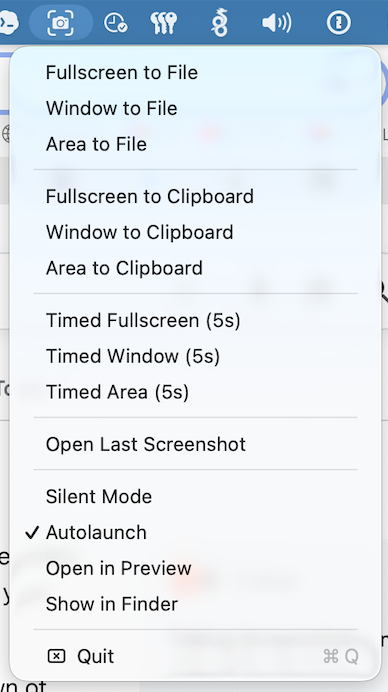
ScreenshotMenu open in the macOS menu bar showing capture options
Everything you need

Powerful capture, zero clutter

All the essentials of a great screenshot tool, packed into one tidy menu bar drop-down.

Fullscreen, window & area

Capture the entire screen, a single window, or drag to select any region — just like native macOS, but faster to reach.

File or clipboard

Save shots as PNG with a smart default name, or copy straight to the clipboard to paste into chats, docs and design tools.

Timed captures

A 5-second delay lets you open menus, tooltips and hover states before the shutter fires. Available for every capture mode.

Silent mode

Mute the camera shutter sound for distraction-free captures during meetings, recordings or late-night work.

Auto-launch at login

Toggle launch-at-login so ScreenshotMenu is always ready in your menu bar — no Dock icon, no fuss.

Open in Preview or Finder

Automatically reveal each new screenshot in Finder or open it in Preview — or reopen your last capture instantly.

Dead simple

Three clicks, done

Built on the native macOS capture engine, so your screenshots look exactly as expected.

1

Click the menu bar icon

The camera-viewfinder icon sits in your menu bar, always one click away.

2

Pick your capture

Choose fullscreen, window or area — to a file, the clipboard, or with a timer.

3

Save or paste

Name your PNG, or paste from the clipboard anywhere. Optionally open it in Preview.

Good to know

Frequently asked questions

What is ScreenshotMenu?

ScreenshotMenu is a free, lightweight macOS menu bar app for taking screenshots. It lets you capture the full screen, a single window, or a selected area, and save it to a file or copy it straight to the clipboard — all from a tidy drop-down menu.

Is it really free?

Yes. ScreenshotMenu is completely free to download and use on macOS 13 (Ventura) or later, on both Apple Silicon and Intel Macs.

How is it different from the built-in screenshot tool?

It uses the same native macOS capture engine, so quality is identical — but it puts every mode (file, clipboard, timed, fullscreen, window, area) one click away in your menu bar, with extras like silent mode, auto-launch and open-in-Preview.

Does it support timed and silent screenshots?

Yes. Take 5-second timed captures to grab menus and hover states, and enable Silent Mode to mute the shutter sound.

Will it clutter my Dock?

No. ScreenshotMenu is a menu-bar-only app (no Dock icon) and uses almost no resources.

Get ScreenshotMenu

Download the signed & notarized DMG, drag it to Applications, and you're capturing in seconds.

Download .dmg
Requires macOS 13 Ventura or later · Apple Silicon & Intel